Apple iPhone safety is a hot topic following revelations that its App Store contains hundreds of thousands of leaky apps and mercenary spyware. Attackers are now targeting iPhones.
Last week, we revealed that the Apple iPhone is not safe – 70% of App Store apps leak hardcore secrets, resulting in hundreds of requests to develop this iPhone Safety Guide.
But it goes far deeper. Apple has issued threat notifications to iPhone users in over 150 countries. It says Mercenary spyware attacks are exceptionally well-funded and evolve over time. The cure is to go to lockdown mode and contact Apple.
Other Apple iPhone safety issues
Fake apps that look like the real ones are present. The excellent LastPass password manager had a deep fake clone that stole your passwords. It was quickly taken down, but not before thousands had been compromised. PS: We strongly recommend LastPass to manage passwords, and it’s an integral part of our recommendations.
Apps you see on Facebook or other social media often redirect you to apps on the Apple App Store, but these are poisoned clones. The fact that they passed Apple’s so-called rigorous testing is bad enough, but many more attacks aimed solely at iPhone.
‘Juice Jacking’, allows malicious public chargers (at airports, etc) to steal data from vulnerable iPhones. The latest iOS (and Android) versions are patched.
Apple iOS has lots of CVE alerts. Recently, it issued an urgent warning to all iPhone users who have updated to iOS 18.3.2 to update again to 18.3.3. There is an issue with the iOS 18.3.2 version that could expose users to security attacks through the Safari browser, allowing devices to connect to your iPhone and steal your data. While Apple has tried to reduce CVEs (down from 200 per year a decade ago), 40 new ones so far this year can affect your security.
High-risk and enterprise users
If you are in a high-risk category (government, politics, military, finance, spies, and their families, etc., nation-state governments are targeting you. Make sure whatever phone you use is sanctioned by your employer and hardened with enterprise safety. Our best advice is to have two phones – one for employment only and one for personal use.
Note that most enterprise security requires that the employer can access the device’s iCloud and monitor or prevent the upload and download of enterprise data. In the UK, Apple no longer encrypts enterprise-related data to the iCloud to comply with Government regulations.
What can you do about Apple iPhone safety?
For starters, stop believing that Apple iPhone, Mac, iPad and other products are safe from malware and viruses – they are not. This false sense of security is your most significant hurdle to a safer iPhone.
Now that you are a disbeliever, start thinking like one.
- Always update your iOS operating system promptly to avoid zero-day attacks.
- Regularly check that your Apps are up-to-date.
- Enable Face and Touch ID and use a strong passcode.
- Never reveal your Apple ID except to Apple – it is the key to the front door
- Change all important passwords for finance, shopping, loyalty cards, mail, and others that could be misappropriated. We strongly recommend you use LastPass as a password manager. The free version is for one device, and you can get a family subscription that covers family users on multiple devices. It also works on Mac, Windows, and Android.
- Switch on Multi-factor identification. This means a passcode is sent by SMS to your phone to verify who is logging in.
- If you must use public Wi-Fi, use a VPN to encrypt traffic. Read Do you need a VPN? (Virtual Private Network guide)
- Never click on links in social media, video streaming, emails or browsers without checking. Go directly to the website instead.
- If you notice the phone acting slowly, unwanted pop-ups, overheating, crashing, or new apps appearing, run the free version of Malwarebytes for iOS. Free means you accept the ‘free 7-day trial’ and cancel after you have run the test. Like all AV software for iOS Malwarebytes cannot remove issues, just identify them. If it finds problems, put the phone into lockdown mode and contact Apple.
Hardware
- Check your Privacy & Security menu. It shows which apps can access your location data, contact list, app permissions, access to the camera/mic and other information. Look at each app and turn off permissions that you feel are unnecessary.
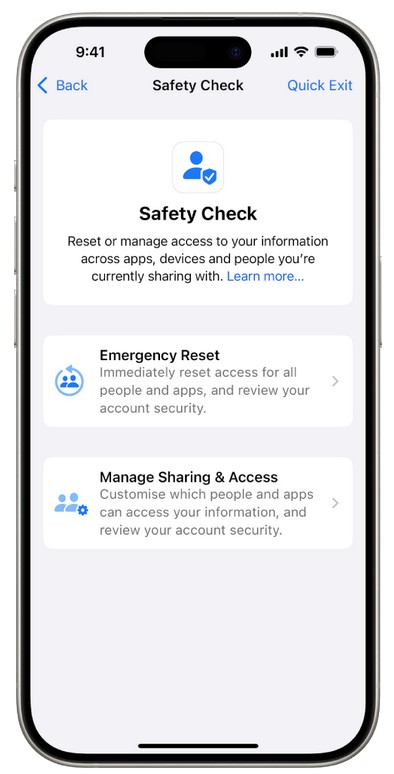
- Safety Check: An Emergency Reset is extreme, but it just means that data sharing with apps and people is reset to defaults. It also allows you to change your Apple ID and check/change emergency contacts.
- Safety Check: Manage Sharing and Access: Check that only the apps and people you trust are sharing your information
- Enable Find my Phone so you can remotely wipe it if lost or misused
Is Android any better?
Yes and no. Android is working overtime to harden its operating system. Starting with Android 13, it had closed most, if not all, CVES. Manufacturers began to offer longer OS upgrades and security patch periods. In addition, Android lets third-party antivirus/malware apps run (iOS does not). So, it seems that in a hardware sense, it has caught up and maybe is even ahead.
Google Play Store app vetting and detection are better than Apple’s App Store.
No phone can be 100% safe, and users must be aware of the risks.
I’mTech’s insight: Apple iPhone safety, well, what you have been led to believe, is a myth
iPhones are as secure as Apple can make them. But they can still catch malware and leak personal data. As we said earlier, you must be aware and take common-sense care.
But when DarkBERT is the most malicious dark web AI admits that it is now focusing on Apple, you have to take extra care, and we don’t even begin to know what to suggest yet.
Apple’s tight control over its ecosystem gives it enormous power, but with that comes responsibility. Until then, the walled garden may look pristine but full of weeds.