
The free NBN Speed upgrade for FTTP and HFC customers will not break your existing modem. You just may not benefit from the extra speed (which is free anyway).
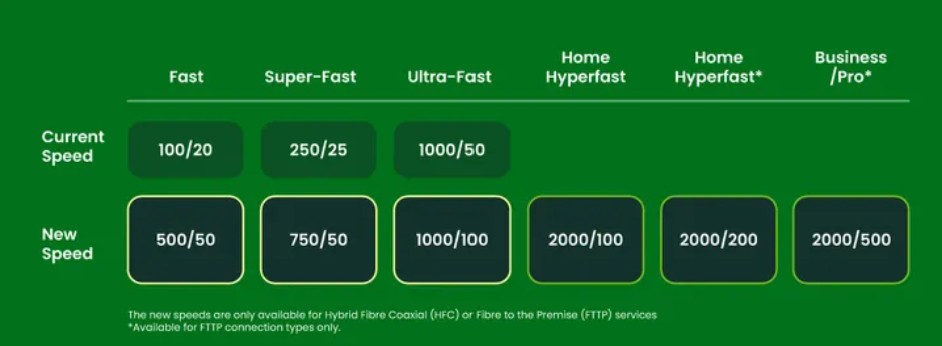
You see, NBN providers sold you a crappy modem/router (Read Faster NBN speeds are coming – can your router handle it?), and some of these, particularly those with Wi-Fi 5 AC and earlier, don’t have the 1000Mbps WAN interface; they max out at 100Mbps. All that means is you will continue to get speeds up to 100Mbps.
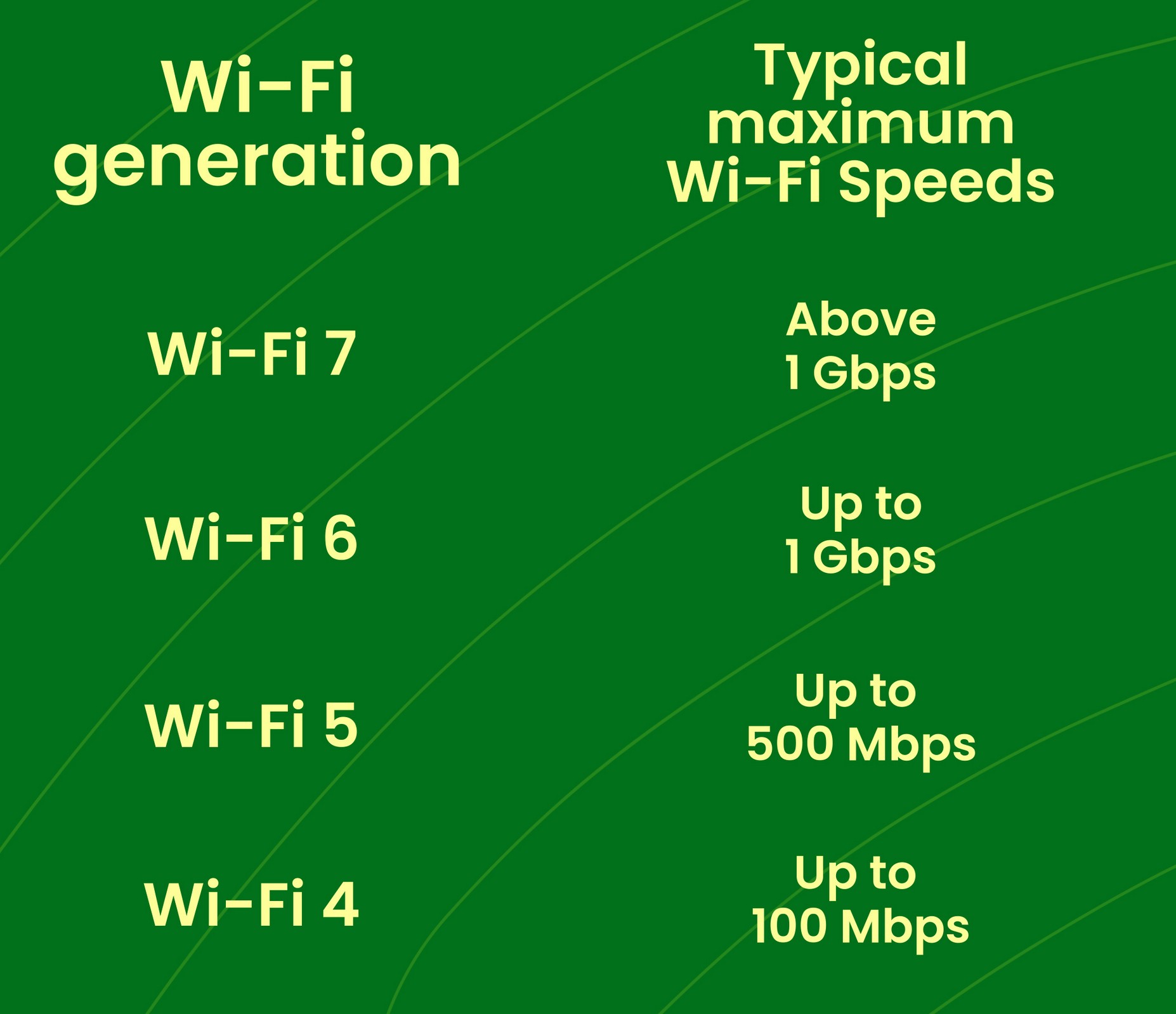
Most of these modems also lack the CPU ‘horsepower’ and RAM to utilise that extra speed, but you will still get enough to use at least 100Mbps. Power users will have long since upgraded to Wi-Fi 6 AX, 6E AXE, or 7 BE.
So don’t panic and don’t fall for the modem BS that we have seen NBN resellers sprouting.
NBN resellers are still selling crap modem/routers!
These are designed to work with Ethernet (FTTP, HFC) or Phone lines (VDSL, FTTN, and FTTC). The latter are not getting the speed upgrade anyway.
Most have a 1 gigabit (1000 Mbps) WAN port (internet in), and the new ones are Wi-Fi 6 AX or some are Wi-Fi 7 (BE). To keep costs low, they are all 2.4 and 5 GHz ‘dual-band’ and frankly, very poor performers, particularly if you want to use mesh.
These also have a landline port if you need that. Some providers, like Telstra, use a proprietary landline port, which means you must use its modem if you are a Telstra customer.
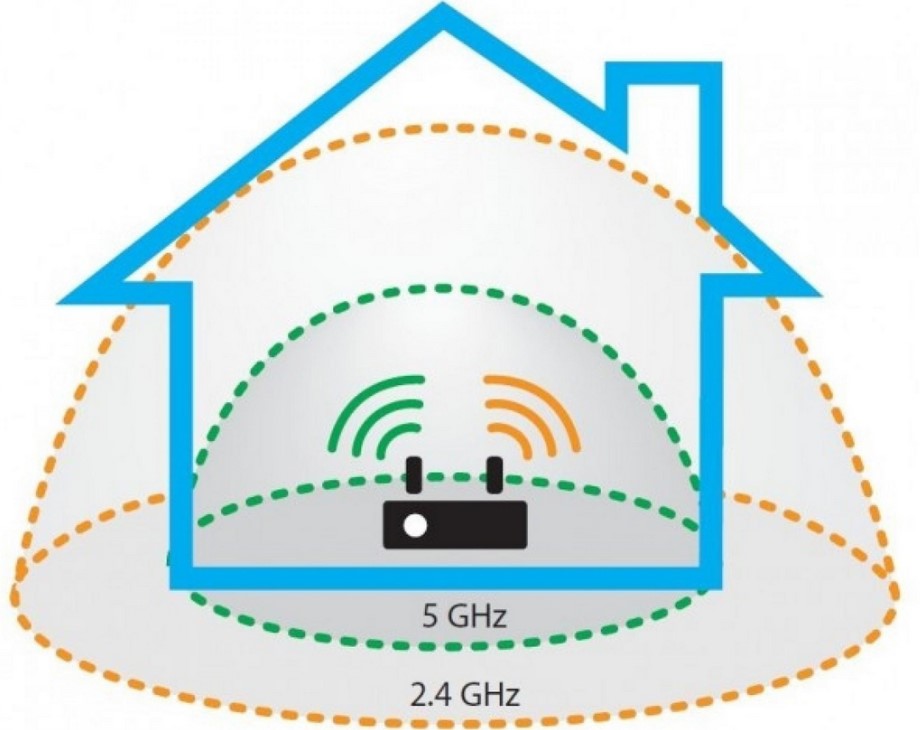
You will get a circular 2D Wi-Fi 2.4 GHz and 5 GHz band coverage of about 20/10 metres. Every time the signal passes through a wall (especially concrete or brick), cupboard, or window, you lose about half the signal strength. Or if you have the modem against an outer wall, you lose 50% of the coverage anyway.
FTTP and HFC users can do so much better than a crappy NBN provider modem.
The real issue is you don’t know what you are missing
Over the past few weeks, we have helped for free over 100 I’mTech newsletter readers to get better whole-of-home Wi-Fi. Read Seamless whole-of-home Wi-Fi is easy with Wi-Fi 6/6E/7 (2025 update network guide).
In essence, we help them determine priorities, such as where they need strong Wi-Fi, the best position for routers, and possible Good, Better, and Best cost options, among other things. The free and unbiased advice is only available in August/September for I’mTech newsletter readers (Subscribe here). We got swamped in August, but we also achieved 100% success because we don’t sell anything, don’t receive a commission, and don’t pass on leads.
Key Free NBN Speed upgrade messages for FTTP and HFC users
Your current modem/router will work with the speed upgrade. It may not take advantage of the extra speed, which you are not paying for anyway.
If your modem is Wi-Fi 5 AC or earlier, it likely won’t be protected from bot hacks, so it’s time to think about upgrading.
Consider whether you are happy with your current Wi-Fi. Does it work with external security cameras and video doorbells? Does Netflix buffer, and does it feel slow? If so, become a I’mTech reader and access our free advisory service.
Don’t be conned – there is no rush to do anything.
Extra reading
Got a Wi-Fi problem but not much cash to fix it?
Don’t rush in for new faster NBN plans
Fix Wi-Fi blackspots fast and often at no cost
Telstra Smart Modem 4 – still a crappy NBN modem. Here is why (update
NBN switching – tired of Telstra, Optus and Vodafone?
Update: special free advice for I’mTech Newsletter Readers
We have had 100% success in helping more than 230 readers since August who have been living with crappy NBN modems and pathetic Wi-Fi speeds. No, we don’t sell anything, make a commission or pass on leads, so you can be sure our advice is free and unbiased.
I am sad that we cannot continue the free service at this scale because it is obviously useful, but it has really affected I’mTech’s output – four posts since last week. We have a backlog of over 30 devices to review, or 8-10 weeks of work, due yesterday!
If you need help, read about what we learned. Crappy NBN modems – the lessons we learned from our free advice. We learned many things about crappy NBN Modems, but most of all that the NBN Reseller does not give a rats about if its modem will work in your home.
If you still need advice (always free to readers), we will provide help. All we ask is that you donate (whatever you think the advice is worth), in I’mTech’s name, to the Smith Family to help give children in need access to tailored out-of-school learning support and mentoring programs, to help them catch up, keep up, and stay motivated in school. Our kids are our future. Or if you don’t donate, why not suggest to 10 friends that they subscribe to our newsletter – do something nice for them.
To access the service:
First, subscribe to our free weekly email. No catch, no junk mail – just an overview of last week’s articles every week.
Then, email a home floor plan (preferably with room dimensions and levels if applicable) to [email protected]. If you can’t find a plan, search for your address, and most real estate listings will have one, or just hand-draw one. Mark on the plan:
- NBN provider and plan speed
- What type of NBN do you have: FTTP, HFC, FTTP, FTTC, etc.
- Where the NBN Network Termination Device (NTD) is (that is, the Ethernet box with a UNI-DI port) or if it’s FTTP/FTTCC over copper, where the phone points are.
- IF you have Ethernet wiring points and where the patch panel is (mark with an X)
- What brand/model of modem/router gateway is attached to the NTD:
- Do you have or need a landline?
- Which rooms must have good Wi-Fi?
- Where the TVs, game consoles/PCs are?
- If you have outside security cameras or a video doorbell, and their placement.
- If you have mesh or extenders, the brand/model and placement
- Your approximate budget.
We will create a Wi-Fi heat map and tell you what you need to get far better Wi-Fi.
A response can take a week or so, depending on workload.
Free NBN Speed upgrade, Free NBN Speed upgrade, Free NBN Speed upgrade, Free NBN Speed upgrade, Free NBN Speed upgrade